This is an old revision of the document!
What is the WAXP Crypto Token?
WAXP is the native utility token of the WAX (Worldwide Asset eXchange) blockchain. Launched in 2017, WAX was specifically designed to make the trading of digital assets—like NFTs and video game items—faster, easier, and carbon-neutral.
- What makes WAX different?
Unlike many other blockchains that can be expensive or slow, WAX focuses on a “consumer-first” experience:
- Zero Gas Fees: For the average user, transactions (like buying or sending an NFT) are free.
- High Speed: Blocks are produced every 0.5 seconds, making trades nearly instantaneous.
- Eco-Friendly: WAX uses a “Delegated Proof of Stake” (DPoS) system that is significantly more energy-efficient than Bitcoin or older versions of Ethereum.
- WAX Cloud Wallet: One of its biggest draws is a wallet that lets you sign up using social media (like Google or Facebook) without having to manage complex private keys.
- How the WAXP Token works
The WAXP token is the “gas” and currency of this ecosystem. It has three primary roles:
- Staking for Resources: To perform actions on the network for free, you “stake” (lock up) WAXP. This gives you a share of the network's processing power (CPU), bandwidth (NET), and storage (RAM).
- Governance: By staking WAXP, you earn the right to vote for “Guilds” (the entities that run the network) and other proposals.
- Rewards: Users who stake their tokens and participate in voting earn more WAXP as a reward.
- Resource Management (CPU/NET/RAM)
On the WAX blockchain, transactions are “free” (no gas fees), but they require system resources. If your transaction fails with an “Account lacks sufficient resources” error:
- Stake WAX: Stake a small amount of WAXP into CPU or NET. This acts as a deposit that gives you the “power” to execute transactions. You can unstake this later if you no longer need it.
- Staking WAXP
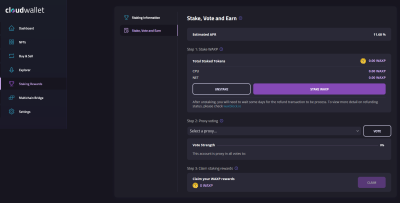
Staking WAXP is unique because it serves a dual purpose: it provides you with the resources (CPU/NET) needed to use the blockchain for free, and it allows you to earn passive rewards by participating in network governance.
Here is the step-by-step guide to staking for rewards
- The Easy Method: My Cloud Wallet
This is the most user-friendly way for most people.
- Log in: Go to mycloudwallet.com.
- Stake for Resources: On the left dashboard, click “Staking Rewards.” Enter the amount of WAXP you want to stake.